JTAG+USB recovery of wiped NOR chip
USB+JTAG recovery of the erased MMX NOR chip
The boot code of the MMX's Nvidia Tegra3 CPU is stored in the [64MB NOR flash chip](/MHI2 MHI2Q Harman Aisin/M.I.B. - More Incredible Bash/POG24 & BYG24 - AndroidAuto & CarPlay Widescreen Patch/Hardware MHI2/) in specific format and consists from [a set of images (partitions)](/MHI2 MHI2Q Harman Aisin/Recovery/Manual FW update 50 vs 70 folders/). See https://http.download.nvidia.com/tegra-public-appnotes/tegra-boot-flow.html
If MMX NOR chip is erased, the MMX board will not boot at all and make the RCC recovery useless as SD/USB will be not mapped to the /net/mmx/sda0 etc anymore.
The MMX NOR chip can become erased by many reasons: a hardware failure, a failed upgrade, a power outage, a stupid attempt to mount an IPL image into the RAM block device, where /dev/fs0 is the MMX NOR chip and /dev/fs1 is the RAM like described in http://www.qnx.com/developers/docs/6.3.2/neutrino/building/building_nto.html
MMX NOR chip becomes erased after you enter something like:
devf-ram &
flashctl -p /dev/fs0 -e
At the moment there are only two known methods of the NOR recovery:
- Desoldering of the MMX NOR (BGA chip), using a standalone programmer to re-flash it from backup, and soldering it back. This method is beyond the scope of this tutorial
- Using an USB-A cable to enable Tegra30 JTAG port and then using a JTAG adapter to flash a backup image into the NOR chip
USB & JTAG Recovery of the MMX
You will need to:
- Remove covers from the MIB unit
- Connect the yellow HSD USB port of the MIB to the USB-A port of the PC/Laptop
- [Connect JTAG programmer to the MMX board pins](/MHI2 MHI2Q Harman Aisin/Recovery/JTAG connection to RCC or MMX/)
- Use MMX_fs0.bin from the backup folder on the SD card, previously made with [M.I.B Advanced Backup](/MHI2 MHI2Q Harman Aisin/M.I.B. - More Incredible Bash/) on this particular unit.
- [Connect a TTL cable to UART of RCC and MMX](/MHI2 MHI2Q Harman Aisin/Shell access via telnet and UART/Connecting TTL adapter to UART on quadlock/) to see in Putty the console output
Usually when there is no valid boot code in the NOR, the Tegra30 chip automatically switches the USB (yellow HSD) port to recovery mode. In this mode, Tegra30 is waiting for a recovery image (or at least a bootloader) to be loaded via the HSD port. As soon as at least bootloader is loaded, it unlocks JTAG port and you can use a [JTAG programmer](/MHI2 MHI2Q Harman Aisin/Recovery/JTAG connection to RCC or MMX/) to reflash the NOR chip.
Segger J-Link Plus with J-Flash app was tested. J-Link Edu has to be compatible too but you will need to find out correct command line parameters for the Jlink Commander app as J-Link Edu does not work via J-Flash app. In theory, FT232 TTL board has to work with OpenOCD at it has support for flashing CFI NOR flash chips too, but this hasn't been tested yet.
You need to extract BCT.bin and STAGE1_RECOVERY.bin from the MMX NOR backup created by [M.I.B Advanced Backup](/MHI2 MHI2Q Harman Aisin/M.I.B. - More Incredible Bash/) on this unit as BCT and STAGE1_RECOVERY are specific to MMX board variant. If you don't have the full MMX backup of your unit, try to ask in the Telegram/Discord group a backup matching the HARDWARE (check FAZIT prefix) version of your unit. Train/software version does not matter here at all.
To extract BCT.bin and STAGE1_RECOVERY.bin from MMX backup, run Tegra-Partition-Table.py like:
python Tegra-Partition-Table.py MU1433-MMX_fs0.bin
Tegra-Partition-Table.py will extract partition in [Nvidia Tegra specific format](/MHI2 MHI2Q Harman Aisin/Recovery/Manual FW update 50 vs 70 folders/):
| Partition Name | Address | Length |
|---|---|---|
| BCT | 0x00000000 | 0x40000 |
| PT | 0x00040000 | 0x20000 |
| STAGE1_RECOVERY | 0x00060000 | 0x40000 |
| STAGE2_RECOVERY | 0x000a0000 | 0x40000 |
| STAGE1_PRIMARY | 0x000e0000 | 0x40000 |
| STAGE2_PRIMARY | 0x00120000 | 0x40000 |
| KERNEL_RECOVERY | 0x00160000 | 0x600000 |
| KERNEL_PRIMARY | 0x00760000 | 0x300000 |
| MAIN_STAGE2 | 0x00a60000 | 0x2a00000 |
| SWDL | 0x03460000 | 0x20000 |
| SPLASH | 0x03480000 | 0x180000 |
| SYSTEM | 0x03600000 | 0x200000 |
| PERSIST | 0x03800000 | 0x800000 |
Additionally, a partition config file mmx_part.cfg in nvflash format will be created.
Booting with nvflash
Once you've got USB connected, you'll need some firmware to load. There are two crucial parts needed here, the BCT (which is nvidia tegra file with hardware specific details) and the Bootloader (common to all units). These can both be found in the 64MB mmx NOR backup created by the Advanced Backup in M.I.B, it should be named something like MU1433-MMX_fs0.bin
Once you've extracted the BCT.bin and STAGE1_RECOVERY.bin, you can run them on MMX via USB HSD cable with nvflash:
nvflash.exe --bct BCT.bin --bl STAGE1_RECOVERY.bin --setentry 0x84008000 0x84008000 --go
If you have doubts about setentry params, see BCT Decoding
On the MMX uart console, you should immediately see something like:
<.STARTUP>
<cpu>: nVidia Quickboot 17.37.03 (Build Jan 14 2019)
<cpu>: modified by e.Solutions GmbH
<cpu>:
Exception : Undefined Instruction!
<cpu>: Displaying register values when an exception occurred:
<cpu>: LR: 0x84063218	SPSR:0x6000005f

<cpu>: R0:0x0	 R1:0x40000010	R2:0x0	R3:0x2

R4:0x84018c14	R5:0x0	R6:0x8400edf8	<cpu>: R7:0x0

R8:0x8400eabc	R9:0x8400eab8	R10:0x0	R11:0x83fff000	R12:0x1c
<cpu>: PC was at location: 0x84063214
The Tegra3 starts running STAGE1_RECOVERY.bin loaded by nvflash and then tries to jump to the non-existent STAGE2_RECOVERY and crashes.
The STAGE1_RECOVERY.bin can be merged with STAGE2_RECOVERY.bin with filling zero bytes between to keep correct memory offset (like both.bl), and then loaded with nvflash, alllowing both to run. You can merge recovery kernel in a similar fashion, but by unknown reason it does not boot correctly. If you want to try to figure out how to load all needed recovery partitions in one go see MMX Tegra Boot Process Details.
Seeing <.STARTUP> is enough to enable the JTAG port and give access to SDRAM at 0x84008000
Tegra3 has strict memory protection in place at all times, preventing JTAG from reading and writing to most RAM addresses. Only blocks of memory where an application is currently executing appear to be accessible, uploading a bootloader over USB makes the memory block at the Load address accessible for use by the Flash Loader.
hrdinaveliky3 recommended to use odmdata to avoid this restrictions but it does not help to flash NOR without using JTAG:
nvflash.exe --bct BCT.bin --bl both.bin --setentry 0x84008000 0x84008000 --odmdata 0x48000000 --configfile "mmx_part.cfg" --create --go
JTAG Flashing
Once a STAGE1_RECOVERY.bin has been loaded with nvflash, it runs and enables the JTAG port of the Tegra3 for programing the NOR flash chip via JTAG programmer.
Some JTAG programmers like Segger J-Link, support programming external NOR flash chips with the help of a CFI flashloader. JTAG programmer loads and runs some small flash loader code into the CPU RAM and then flash loader handles the flash erase, program and verify operations.
As per OpenOCD documentation https://openocd.org/doc/html/Flash-Commands.html, it supports programming external CFI flash chips via FT232 adapter. Try and report here!
Flashing the backup via JTAG programmer
Rename the backup file from MU<version>-MMX_fs0.bin to just MMX_fs0.bin then run
"C:\Program Files\SEGGER\JLink\JLink.exe" -CommanderScript mmx_jlink.txt -Device cortex-a9 -SI jtag -Speed 1000 -JTAGConf -1,-1
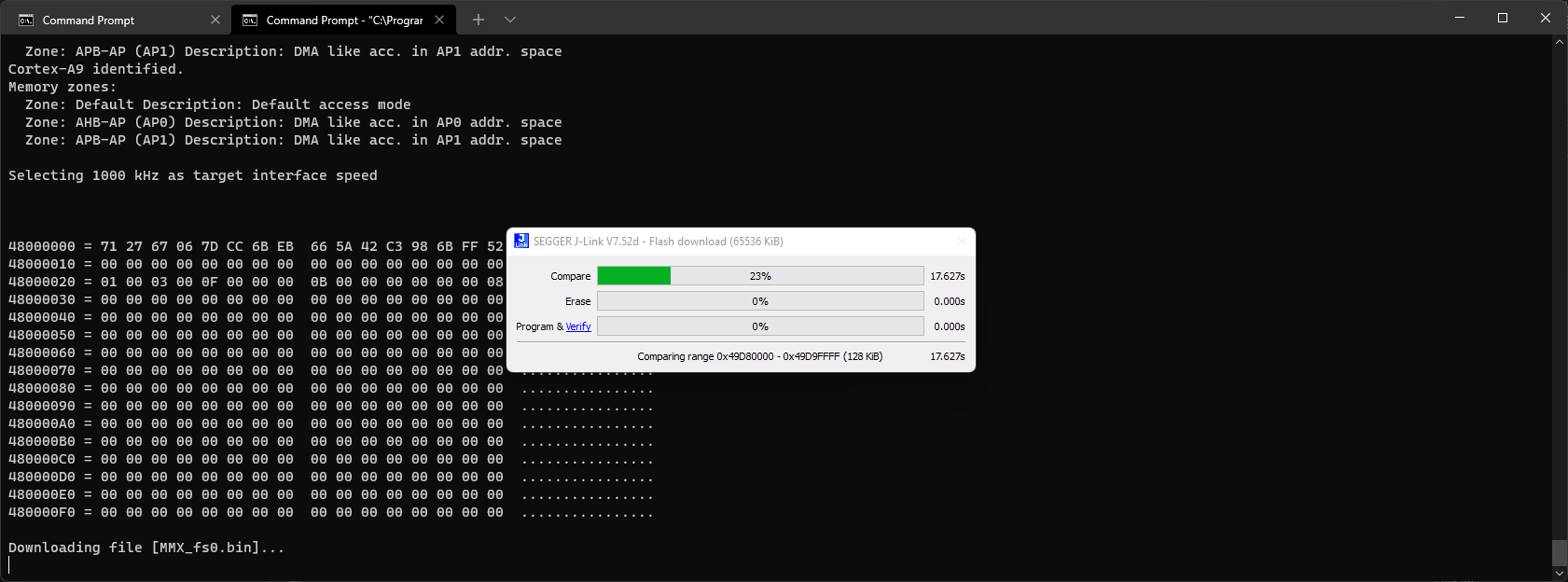
RCC watchdog timer will be running in parallel and reboot the unit every minute or two. You can [enter to Emergency IFS on RCC Blue EFU](/MHI2 MHI2Q Harman Aisin/Recovery/RCC/How to mount RCC NOR fs0/How to boot ifs-emergency.ifs start blue emergency EFU/) to try to prevent the rebooting but will not really stop it. So when J-Link will fail due to the reboot, just re-run JLink again and it will skip already flashed block and will continue. It might take a few goes but will definately manage to finish this bothering task 😀
If the rebooting is really getting in the way, preventing the flash process from completing, you can try to leave it part done. Once the first third / half is done, it should be enough to get the emergency boot mode running and can complete the flash process there.
Either way, you'll want to now turn off power, remove the USB boot jumper, then boot it up again. Hopefully it powers on and is working properly good as new (remember to press the power button on the MIB Screen if it's still starting up black)
If it looks like it's starting to boot on the MMX UART, but not properly, it's now time to switch to RCC UART and try out emergency mode. Use the instructions on [Enter RCC BLUE EFU - EMERGENCY IFS](/MHI2 MHI2Q Harman Aisin/Recovery/RCC/How to mount RCC NOR fs0/How to boot ifs-emergency.ifs start blue emergency EFU/) to get into emergency IFS mode; you'll need the emergency mode password that matches your firmware version for this.
Once you've got the RCC emergecy ifs console up, copy your MMX backup file onto a SD card and insert into SD1.
On the RCC command line, re-flash it with
stfu
flashunlock
on -f rcc flashit -v -x -d -a 0 -p /net/mmx/dev/fs0 -f /net/mmx/fs/sda0/MU1433-MMX_fs0.bin
This will restore the content of the entire NOR chip from the backup and after repowering, MMX has to start booting again.
In theory, the USB recovery mode can be used by itself to re-load the software onto the unit. The main PC tool for communicating with USB RCM mode is nvflash which is typically used in production to program new units. This tool however relies on a bootloader being used that supports its special USB nv3p communications protocol. Typically a tegra specific version of fastboot would be used, however these need to be created to match the specific hardware layout of the tegra board in use, but the source for this bootloader is not available an no fastboot has been found from other devices (nvidia dev boards or tegra30 phones) that is compatible enough with mmx to work. u-boot is another bootloader commonly used on tegra30 boards, but it doesn't support the NOR chip. @coronafire on telegram has compiled a u-boot that can run on mmx, but without NOR support it can't be used to reflash the unit.