Updating maps
Updating maps
:::info Starting from P106 version maps require 16Gb SD card. Probably you can delete some *.psf files to make it fit to stock 8Gb card
:::
The latest available EU maps on mibsolution.one is P106_N60S3MIBS2_EU_NT.7z\nContent of DBInfo.txt file on SD:
PartNumber1="V03959803RQ"
PartNumber="V03959803RQ"
ApplicationSoftwareVersionNumber="0106"
SystemName="ECE 2023"
:::info Maps work from original FAT32 formatted 8Gb SD card having special CID and are NOT copied into internal memory of the unit.
It is confirmed that P106_N60S3MIBS2_EU_NT maps work on MSTD_EU_SE_P5310 from original SD card without installing any FEC! 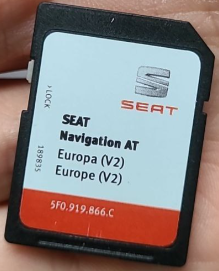
:::
Understanding original SD card and FEC protection
To use the maps you need:
- Original 8Gb FAT32 SD card with special CID
0941504d49425354102d702df000d700cards for MST2 Delphi/Technisat can be used too.
:::info There are following known ways to pass the CID check:\na. Find some old Samsung EVO/EVO+ SD card and change the CID like described here.\nb. Order "Custom CID" SD card from AliExpress. Note: those cards are low quality and die soon.
c. Patch CID check (**"**MIBST" PNM) in CPU_HMI.EXE.
:::
-
To have FECs 00040100 (Navigation) and 022000ee or 022000f0 (lifetime EU maps) as allowed in "Activation keys" of RED menu:
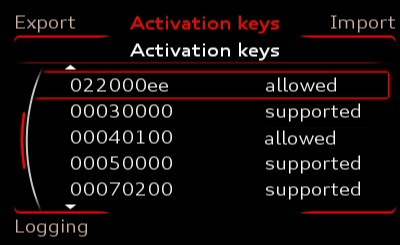
:::info You can install Actvator by Enthusiast to enable all FECs
:::
MSTD_AU* firmwares check every *.psf file in \markets\eu\map\MapRegions\ folder on the maps SD.
:::warning
Looking at the end of *.psffiles of P106_N60S3MIBS2_EU_NT maps, you can see that on Audi, Activation key (FEC) 02200030 or higher is required.\n 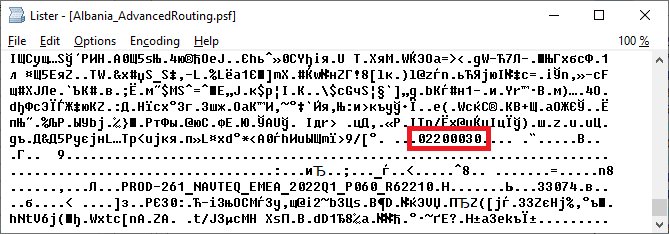
:::