MIB3 FoD Activator
MIB3 FoD Activator
Activating FoD (Function on Demand) by writing FECs (Feature Enabling Codes) into ECU #19 (Gateway):
🚨 DISCLAIMER – PROCEED AT YOUR OWN RISK
The process involves modification of the firmware of the gateway control unit (ECU #19) of your vehicle. If done incorrectly, it can permanently damage your gateway or other control kkkmodules. Even if you follow the steps precisely, there is still a risk of unintended issues or irreversible damage. Do NOT attempt this if you are not experienced with vehicle diagnostics and flashing procedures.
Takle into account:
- If the car has air suspension (DCC) or a heated steering wheel, these features may stop functioning correctly. To restore them, you will need to use online GRP (VAS6154 + ODIS-S 24+), followed by a proper solution.
- The main issue is that the gateway controls multiple functions. When updating it, you must write the correct dataset. The best approach is to update online using an official SVM (if available) and only after upgrading to a 4xx version or higher, apply the necessary patch.
Required cable and software:
- ENET (DoIP) cable: to connect the laptop to the vehicle.
- ODIS-E 17 or 18 (only this versions work with cheap ENET cable)
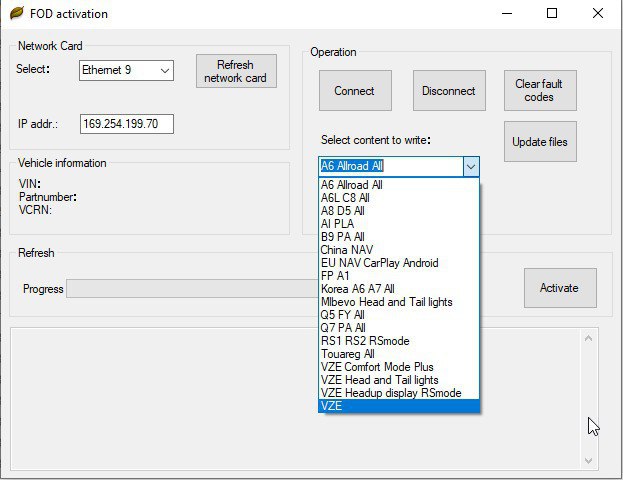
- FOD Activation Tool
Activation steps:
- Connect the Vehicle:
- Use the ENET/DoIP cable to connect the laptop to the vehicle.
- Ensure the proper network card (Ethernet) is selected in the FOD activation tool.
- Run the FOD Activation Tool:
- Select the desired FoD (e.g., VZE, RSMode, etc.) from the dropdown menu in the activation tool.
- Click Activate to write the FEC into the gateway (ECU #19).
Flashing the gateway firmware:
- After patching, restore the original gateway firmware using ODIS-E to maintain system integrity.
- Important settings in ODIS-E:
- Disable Parallel Flashing: Go to "Admin Settings" in ODIS-E and untick the Parallel Flashing option.
- Flash the original firmware of the gateway control unit (ECU #19) back to the vehicle.
Functionality after flashing:
- Once the firmware is restored, all FoDs will remain enabled in the system.
- SVM Functionality: The system should work normally, including online functionalities like SVM.
Technical Notes:
- The flashing process modifies the gateway firmware (ECU #19) with an updated public key.
- A new FEC (Feature Enabling Code) is generated and written into the firmware.
- The patched gateway allows the FoDs to stay enabled while functioning as intended.
🚨 FINAL WARNING
- This solution WILL DAMAGE YOUR GATEWAY IF YOU DO NOT KNOW WHAT YOU ARE DOING.
- There is a real chance of bricking the gateway even if the steps are followed perfectly.
- Proceed only if you are fully aware of and accept the risks and have experience with vehicle flashing tools.