5F - Rear View Camera (RVC-HIGH) installation
:::warning
Units xxx 035 819 and xxx 035 820 do not support RVC (no video input support).
:::
:::info RVC-HIGH have orange dynamic guidance lines, additional view modes (parallel parking, towing, fish-eye), video feed is visible while the vehicle is moving forward, and the camera can be triggered with parking sensor button.
:::
:::info RVC-HIGH requires calibration/parametrization if the camera is new of from a different model of vehicle. Getting used camera might be saving you some time.
:::
:::info
RVC-HIGH is connected to CAN-BUS network and is accessible at address 0x6C.
:::
:::info RVC-LOW retrofit will be a little bit simpler and less expensive.
:::
Parts
Part numbers are hard to keep track of with VAG continuously superseding/changing part numbers. In general you need to look for a camera that fits the handle or with correct size swinging emblem or with mounting support (Seat Leon and Ibiza).
For Leon and Ibiza the bumper needs to be cut, see template
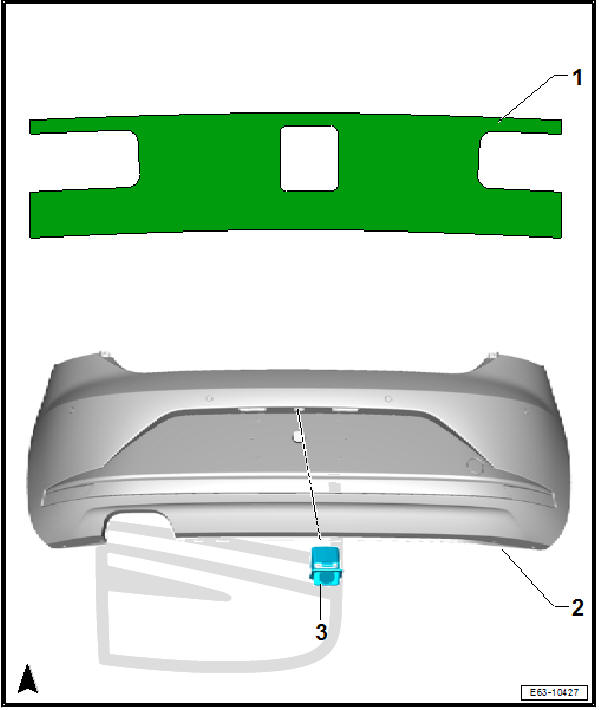 more info: https://www.seatia.com/secon-917.html
Camera
- VW Golf MK7 hatchback:
5G0-827-469-H; 5G0-827-469-P; 5G0-827-469-R; 5G0-827-469-T, 5G0-827-469-AF
* VW Golf MK7 estate/variant:
5G9-827-469-G; 5G9-827-469-H; 5G9-827-469-Q; 5G9-827-469-S; 5G9-827-469-AA, 5G9-827-469-AG, 5G9-827-469-AJ.
* VW Golf sportvan:
510-827-469-E, 510-827-469-G, 3G0-827-469-BL, 3G0-827-469-CA, 3G0-827-469-CJ, 3G0-827-469-FL, 3G0-827-469-FS.
* VW Passat B8 estate/variant and Arteon coupé with back glass high polished logo:
3G0-827-469-E, 3G0-827-469-H, 3G0-827-469-E, 3G0-827-469-L, 3G0-827-469-AA, 3G0-827-469-AQ, 3G0-827-469-BB, 3G0-827-469-BJ, 3G0-827-469-BL, 3G0-827-469-BS, 3G0-827-469-CA, 3G0-827-469-CG, 3G0-827-469-CJ, 3G0-827-469-FL, 3G0-827-469-FL, 3G0-827-469-FS, 3G0-827-469-GC, 3G0-827-469-HN.
* VW Passat B8 estate/variant and Arteon coupé with black/bright chrome logo (new logo from 2020):
3G0-827-469-EK, 3G0-827-469-ER, 3G0-827-469-FE, 3G0-827-469-HE.
* VW Passat B8 sedan and Arteon sportback with back high glass polished logo:
3G0-827-469-F, 3G0-827-469-CD, 3G0-827-469-FM, 3G0-827-469-FT, 3G0-827-469-HK.
* VW Passat B8 sedan and Arteon sportback with black/bright chrome logo (new 2020 VW logo):
3G0-827-469-EG, 3G0-827-469-EN, 3G0-827-469-FL, 3G0-827-469-FH, 3G0-827-469-HB.
:::tip Seems like golf sportsvan and passat/arteon share the same camera with different badging.
:::
:::tip
To distinguish camera between highline (PR-KA2) and rear camera for area view (PR-KA6) look at video connector, grey for low and highline and blue (with 4 video wires) for area view.
:::
Wiring kit
AliExpress: http://ali4cars.com/s/?p=vw-mqb-rvc-high-wiring
Coding
Add new module to gateway installation list
19→ adaptation →Installation list→specified installations - Camera System Rear View→coded
Enable RVC-HIGH in MIB module
5F→ Long Coding → Byte:19→ Bit:4→disable5F→ adaptation →Car Function List BAP Gen2→VPS_0x0B→activated5F→ adaptation →Car Function List BAP Gen2→VPS_0x0B_msg_bus→Comfort data bus
Enable camera support in parktronic module
10→ Long Coding → Byte:02→ Bit:4→enable10→ Long Coding → Byte:02→ Bit:5→disable
:::info
Some older cars will have parktronic module available at address 0x76 instead of 0x10.
:::
:::info Cars with 4k pdc might need to be set as reverse camera not installed in pdc unit.
:::
Enable camera BAP communication
6C→ Long Coding → Byte:10→ Bit6BAP for display data
Code vehicle and region
6C→ Long Coding → Byte:00→ vehicle brand6C→ Long Coding → Byte:01→ vehicle class and generation6C→ Long Coding → Byte:02→ vehicle body type6C→ Long Coding → Byte:03→ region
Code vehicle optional equipment
:::info Your car might not support all the features below. Only enable those that are actually installed in your car
:::
6C→ Long Coding → Byte:04→ Bit0Trailer Control Unit (J345) installed6C→ Long Coding → Byte:04→ Bit1Optical Parking Sensors (OPS) installed6C→ Long Coding → Byte:04→ Bit2ParkSteer Assist (PLA) installed6C→ Long Coding → Byte:04→ Bit5DSG/Automatic Transmission installed6C→ Long Coding → Byte:04→ Bit6Swinging Logo installed6C→ Long Coding → Byte:04→ Bit7Electric Parking Brake (EPB) installed6C→ Long Coding → Byte:10→ Bit2Trailer Towing Assistant (TTA/ARA) Mechanical installed6C→ Long Coding → Byte:10→ Bit3Trailer Towing Assistant (TTA/ARA) Optical installed6C→ Long Coding → Byte:10→ Bit4Tow Bar (AHK) installed6C→ Long Coding → Byte:10→ Bit5Rollback recognition
:::info Cars with 4k pdc might need byte04bit0 not active
:::
Enable all 4 view modes in camera module
:::info This might be VW/Seat/Skoda specific. Not sure if Audi supports all those 4 modes.
:::
6C→ Long Coding → Byte:07→ Bit:0→enable(standard 90° view)6C→ Long Coding → Byte:07→ Bit:1→enable(parallel parking assist view)6C→ Long Coding → Byte:07→ Bit:2→enable(trailer towing view)6C→ Long Coding → Byte:07→ Bit:4→enable(fish-eye/cross-traffic view)
Other coding options
:::info The same coding template is used both for RVC-High and Area View. Not all options will be available for all camera setups.
:::
6C→ Long Coding → Byte:04→ Bit:3-4Steering variant6C→ Long Coding → Byte:05→ Bit:0Camera input: Rear6C→ Long Coding → Byte:05→ Bit:1Camera input: Left6C→ Long Coding → Byte:05→ Bit:2Camera input: Right6C→ Long Coding → Byte:05→ Bit:3Camera input: Front6C→ Long Coding → Byte:05→ Bit:4Camera input: Interior6C→ Long Coding → Byte:05→ Bit:5Camera input: Trailer6C→ Long Coding → Byte:06→ Bit:0Warning message via FSG6C→ Long Coding → Byte:06→ Bit:1Resolution of warning message in QVGA (instead of VGA)6C→ Long Coding → Byte:06→ Bit:5Deactivation of rear driving direction display-
6C→ Long Coding → Byte:09→ Bit:53D Presentation -
6C→ Long Coding → Byte:??→ Bit:?Cleaning option 6C→ Long Coding → Byte:??→ Bit:?Flicker frequency6C→ Long Coding → Byte:??→ Bit:?Warning message method
Additional light when using camera
:::info This will turn on welcome lights fitted under side mirrors to improve visibility. This feature was designed to 360 Area View (4 camera system), but you can use it with RVC High as well.
:::
6C→ Long Coding → Byte:08→ Bit:2→enable(manoeuvre light)09→ Security Access → Code:3134709→ Adaptation →Aussenlicht_uebergreifend - Umfeldleuchte als Manoevrierleuchte→enable
Hide parking sensor image overlay by default
5F→ Long Coding → Byte:16→ Bit:7→enable(hide sensors overlay by default)
Sample coding
- 2015 VW Golf MK7, Variant, Europe, RVC-High:
01 73 02 01 E2 00 20 17 00 00 40 - 2018 Audi Q7 4M, Europe, RVC-High:
02 37 06 01 12 00 20 01 40 00 40 - 2017 Audi A4 B9, Area View:
02 94 01 01 BA 0F E3 00 08 71 40 04 - 2016 VW Passat B8, Sedan, Europe, Area View:
01 84 01 01 E7 0F 20 00 00 20 40 14 - 2016 Audi A7, Europe:
02 75 03 01 02 01 00 03 00
Parameterization
:::info Not needed if installing used camera from the same model of vehicle.
:::
==pending…==
- Camera control unit module is
5QO-980-556B or 5Q0-980-568-B,… - Area view control unit is 5Q0-907-556_
- There are datasets available on mibsolution for these cameras are other models
- If mounting a brand new camera without dataset (virgin unit) it will give 3 errors (
B2013,B2010,U1013). Long coding will be00 00 00 00 00 00 00(all zeros), and it will reject coding attempts. To see if wiring is proper it will be present as6Camong modules. For vehicles with swinging logo it can also perform output tests: it pops out when triggered, but without dataset it won't show the video feed. - Once a dataset has been loaded a full long coding will be needed to activate the camera. Use coding from same model or from module whose dataset you loaded.
\
e.g. for Golf with OE 5Q0980568 camera 01 73 00 01 E6 00 23 1F 00 00 40 and then adjust it for options present on the car.
5Q0980556B Dataset collection + coding example.zip 4485780
==In the archive there's a wide variety of datasets and some example codings for most MQB cars==
Basic settings
:::info Not needed if installing used camera from the same model of vehicle.
:::
:::tip Good to perform anyway to make sure that the guide lines and optional views are displayed correctly. This should be performed when camera position changes (removing and reinstalling the camera assembly, lowering the vehicle…).
:::
==pending…==
- Best performed with ODIS-S using guided functions, needs calibration board
VAS 6350. Look into car workshop manual for the distance from the rear axle, typically it's 1.5M-2M. ODIS-S might provide suggestions during the guided function. - Without calibration the rear camera will work normally but an error (
B2010- No basic settings) will be present and the video feed might be slanted.
Vehicle pin-out
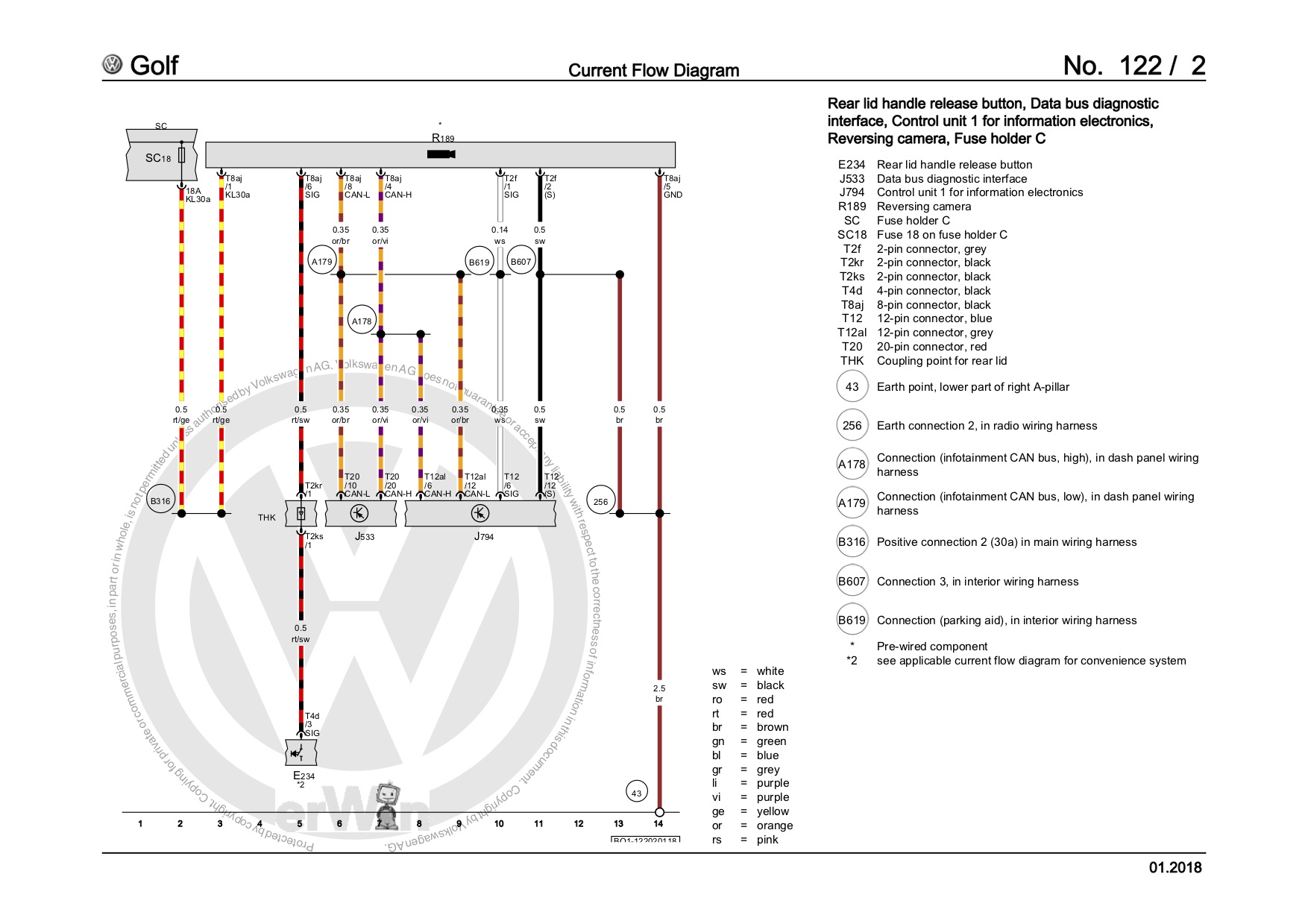
- MIB → Quadlock → connector B (blue) → pin
6→ video signal - MIB → Quadlock → connector B (blue) → pin
12→ shield - MIB → Quadlock → connector D (grey) → pin
6→ CAN-BUS high - MIB → Quadlock → connector D (grey) → pin
12→ CAN-BUS low - Cabin fusebox → fuse
18→ term. 30 power to camera and mechanism (7.5Amp fuse) - Cars with swinging emblem need to add two wires to the lid handle release connector (E234): power from Sc18 on pin4, opening signal from camera control unit to pin3 (pin on camera control unit depends on the control unit, look R189 in the specific car diagram)
VW Golf MK7 5G - Current Flow Diagram - high RVC.jpg 299530
Video tutorials (VW Golf MK7 specific)
Part 1 - test of used camera with messy wiring
Part 2 - wiring with AliExpress kit
Part 3 - coding and adaptation
Part 4 - basic settings and calibration
==pending…==