MHI2_ER_AU57x_K3663_1 MU1425 AIO
:::info Custom all-in-one FW update based on metainfo2 exploit.
:::
:::warning Read all before updating.
:::
:::tip Last update March 30 2022
:::
Requirements
- Audi with MMI MIB2 system (any
MHI2_ER_AUG11orMHI2_ER_AU57x), - quality SD card,
16GBcapacity or more (how to check SD card), - Update package (download: https://mibsolution.one/au_3663_aio).
How to install
- Format SD card with
FAT32file system. - Extract the content of All-In-One package to the root directory of SD card.
- Turn the ignition on, wait for the Audi MMI system to boot up.
:::warning Make sure that the car key will not leave the vehicle during the firmware update procedure (learn more about Kessy and updates).
:::
- Restore factory settings by going to
MENU→Setup MMI→Factory Settings→Select all entries→Restore factory settings. - Wait for about 20 seconds for the factory settings to be done.
- Place SD card in
SD 1port. - Press and hold
BACK+TOP-LEFTto enter REM (hidden Red Engineering Menu).
:::info Check how to do it in your car with Audi MIB2 key combinations.
:::
- Go to
Update→SD 1→Standard. - Scroll down to the end of the list and select
Start update→Start. - Wait for the update to be installed. It will take some time, the system will reboot couple times during firmware update procedure. Screen can stay off or stuck on Audi logo for several seconds. Be patient and wait. In my case it took 34 minutes to go from old
S0037to newK3663.
Video tutorial
Features
- All in one update from any
MHI2_ER_AUG11orMHI2_ER_AU57xfirmware directly toMHI2_ER_AU57x_K3663_1. No need to manually edit EEPROM. No need to disable or loop MOST. - Developer Mode with GEM (hidden Green Engineering Menu) will be enabled during the installation. No need for
OBDeleven,VCDS,VCP. - Patched IFS-Root (FEC & CP patch) will be used during the installation.
- FecContainer will be adjusted with missing FECs (
00040100,00050000,00070200,00030000,023000EE,00060800,00060900) during the installation. - CarPlay and AndroidAuto will be enabled during the installation.
- GraceNote2
v21will be installed. - Fix for rear control head error after update from
P0040or older.
Bose Sound System & B&O update
Standard is not including BOSE and B&O update.
By default this procedure will not update Bose amplifier. metainfo2.txt was prepared to skip this component, because updated amplifier will required parametrization which must be done with VCP or ODIS.
:::warning Without the parametrization you will have no sound.
:::
If you wish to update Bose you can use different metainfo2.txt to do it.
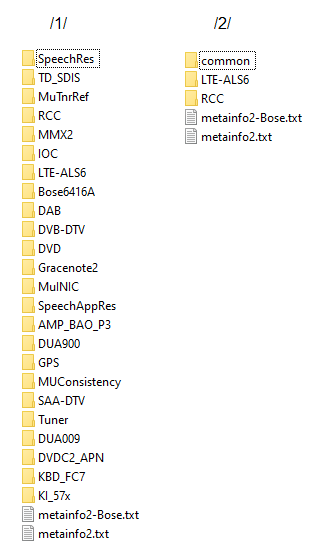
- Remove
metainfo2.txtfrom both/1/and/2/directories. - Rename
metainfo2-Bose-BO.txttometainfo2.txtin both/1/and/2/directories. - Run the update from red engineering menu.
- Perform parametrization afterwards.
SVM
If you have access to official SVM (ODIS/Geko) you can use that with SVM code MHI2ER3663.
On older models with stock - before you updated to 3663 - 00xx and 2xxx versions firmwares you can use the "Downgrade" update in the K3663-to-K2589-Downgrade-SVM(MHI2ER2589).7z archive.
This will downgrade all needed modules - BUT will leave 3663 on unit - to be able to pass SVM with code MHI2ER2589, all activations and features remain.
After SVM you will have to enable Carplay and AA again in adaptions! Use e.g. M.I.B to reactivate them.
Unit will get new Calibration from SVM, FECs should remain.