Reading/writing eMMC
:::warning There is a high chance to brick your device. For everything you do ONLY you are resposible!
:::
Some basic information
:::tip Read the whole tutorial and nested documents to understand what you have to do.
- Read memory content and save it to
IMGfile. - Convert
IMGtoVMDK* - Mount
VDMKin QNX VM* - Do your stuff in QNX VM*
- Convert (modified)
VMDKtoIMG* - Write your modified
IMGback to the Unit
* Step 2-5 if you want to modify data.
:::
:::info If you want to modify data, the easiest and (in my opinion) the safest way will be to install the MIB Toolbox.
:::
This repository contains some scripts, documentation how to upgrade the MIB2 firmware to a different SW/HW train (e.g.: 02xx → 03xx/04xx) and other things. The documentation is for the Technisat MIB STD2 unit without navigation and works also on units with navigation. It describes how to patch the swdownload binary, that the unit accepts updates for a higher HW train. Install the MIB2 Toolox, and other things (maybe soon).
Some of this informations are from another tutorial using Linux. I add the informations to use Windows and Qemu (nested Docs) and leave the additional Infos with Linux and modify the swdownload section for upgrade the SW as written before untouched as nested document. \n In addition to this (and nested) repository it's required to have access to theMIB Solutions. There you find the firmware updates and tools to patch the swdownload binary.
The tutorial will be continued.
:::info
For MIB2 without navigation it's currently not possible to patch the swdownload binary with the Update-Approval_SOP4_signed method, because of the different CPU (cpuplus instead of cpu). To patch the swdownloadyou have to dump the eMMC, exchange the binary and write everything back to the unit. \n The eMMC of the MIB2 with navigation can be read with an adapter from the second SD card reader. For the model without navigation the only way to read the eMMC is to connect to the through-hole plating on the PCB. This can be done by soldering very thin wires to the holes or contact them with probes or use BDM needles.
:::
:::tip Save your "untouched" dump if you want to do a complete restore!
:::
Read/Write prepare the HW
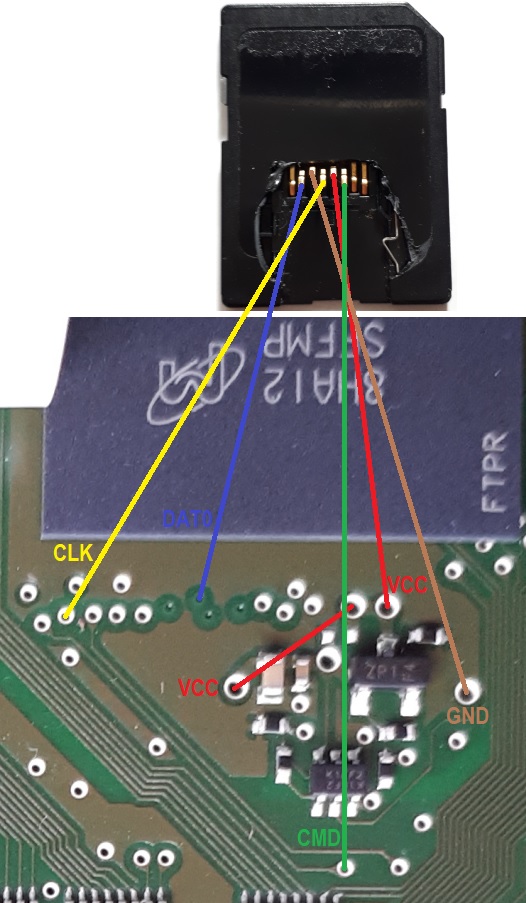
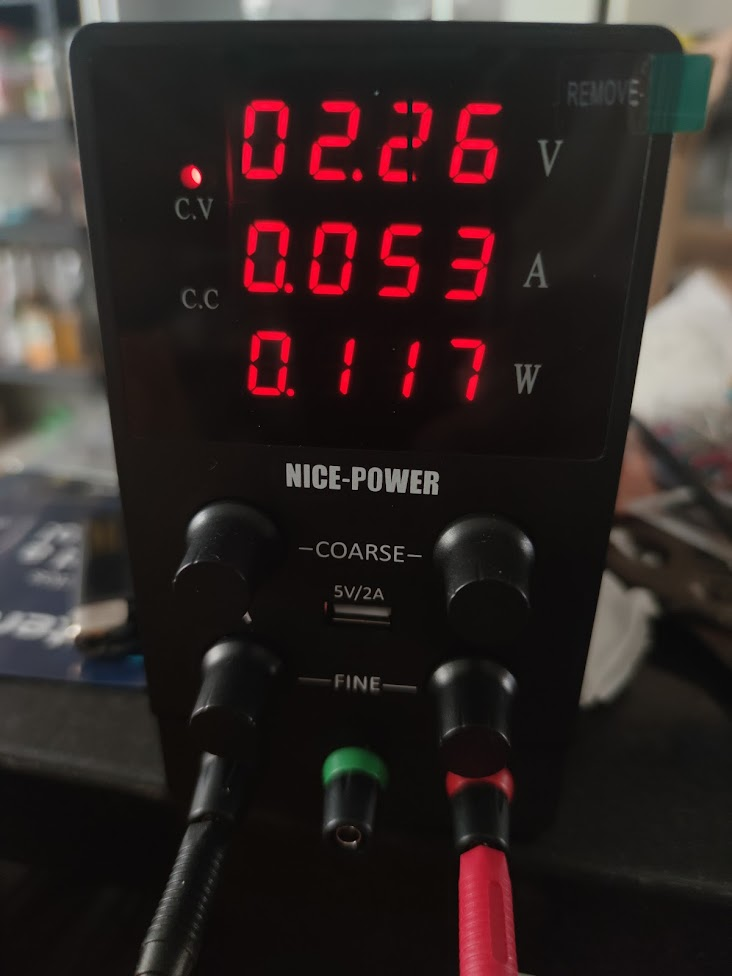
Connect a SD card reader (SD Card Readers (working/not working)) to the eMMC through-hole plating (soldering or probes). For me the connection was only stable with DATA0 connected and DATA1-3 disconnected (slow read & write). You can bridge the VDD (3,3V) as seen on the second picture. The VDD is translated into two voltages values, one for the Core and the other for the I/O. Take into account that not all the eMMC chips use the same values for the Core Voltage (VCC) and the I/O Voltage (VCCQ), usually the VCCQ voltage is slightly lower. Also not all SD card readers give the full 3.3V. In the following pictures the VCC is at the top right and the VCCQ is at the bottom left. Usually VCC works with +2.7\~+3.6V and VCCQ works with +1.1\~3.6V, depending on the chip. There are some cases where VCCQ needs to be at least +2.1V and less than +2.4V; if the voltage exceeds that range the I/O part of the chip gets over-voltage protection and the dump is corrupted.
:::warning
If you put too much voltage to the I/O VCCQ portion of the chip, the read will have a lot of failures, making it unusable (usually a lot of CRC errors). If you find yourself having this after bridging the voltage points try to decrease the voltage for the VCCQ portion (the one at the bottom left according to the next picture)
:::
Working SD Card Readers
ZR
eMMC pinout (with all DATlines): \n 

- Another pinout for ZR this box have emmc component on the bottom side of the card (Skoda 5Q0035819*):
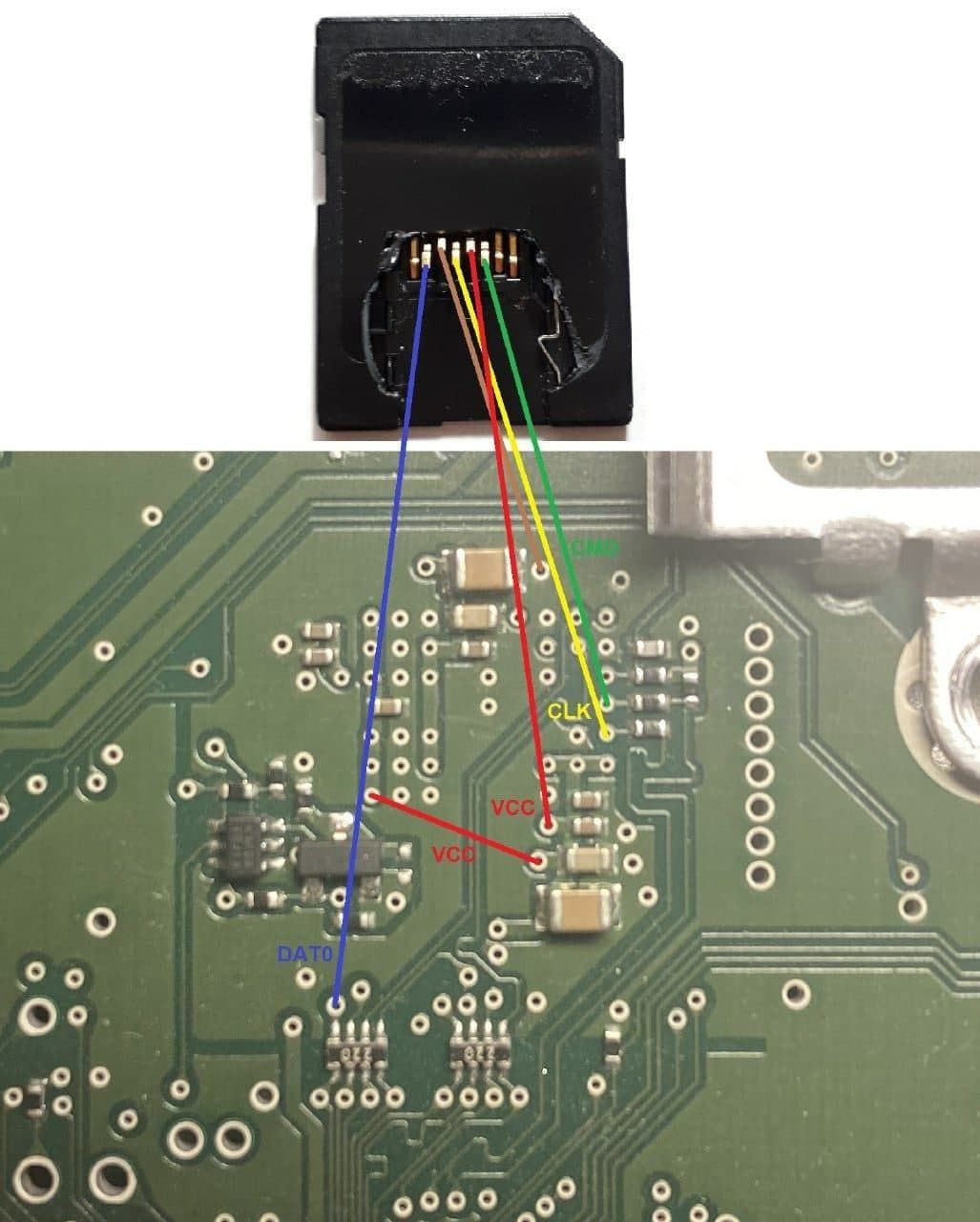 * See this image for a SD card pinout (and
 DAT0 only) (the VCC to VCC is a bridge from the upper left to the bottom left. If you dont want to use a bridge, you have to put the second VCC to the bottom left).

 * Voltage for
 VCCQ at +2.26V avoiding the I/O part of the chip to fail do to over-voltage
 * example of two different voltages for
 VDD(VCC AND VCCQ) with alternative pinout (yellow is CMD, green is CLK and white is DAT0) 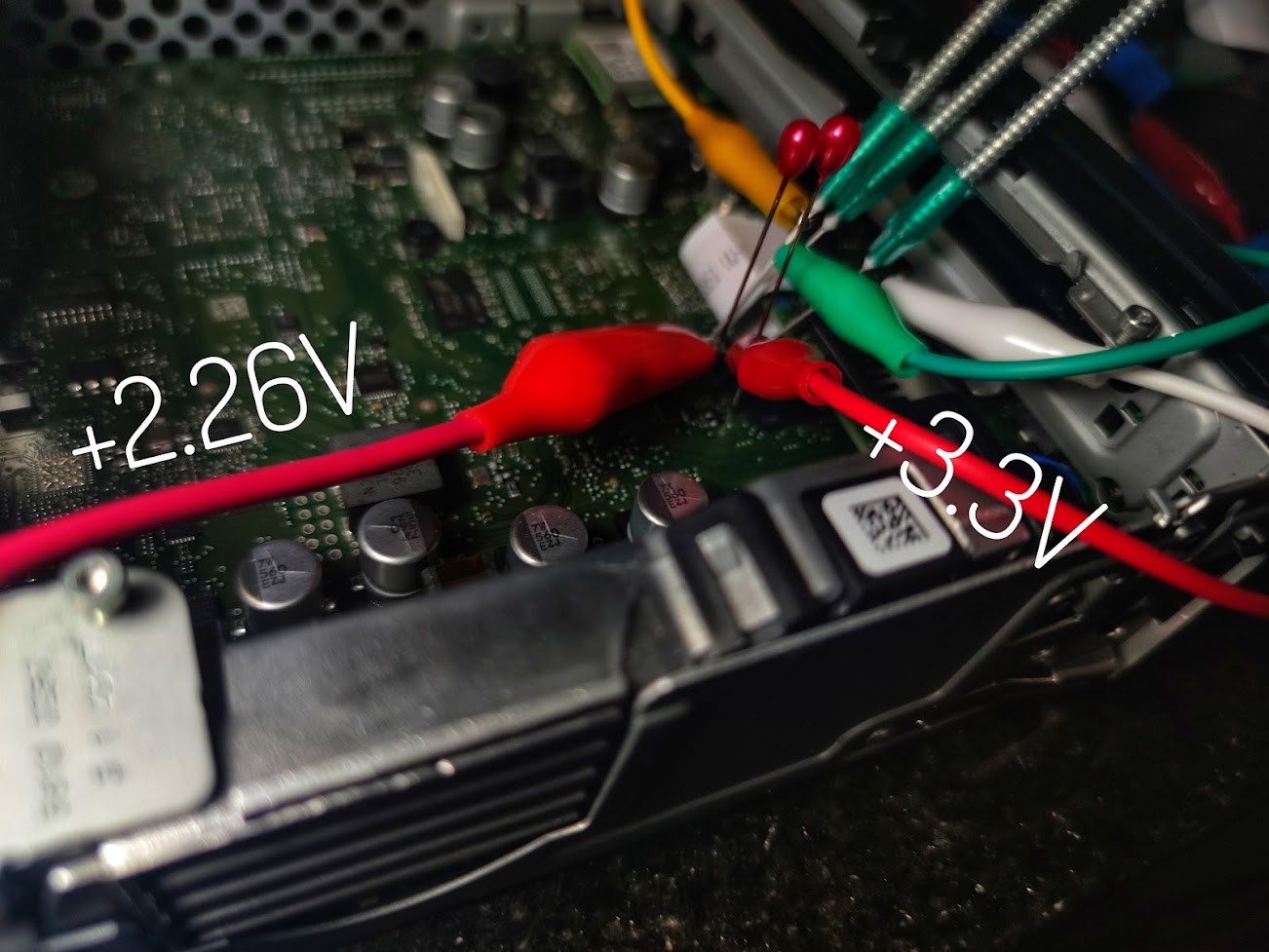 * example ZR of probes soldered to a USB SD card reader (alternative pinout)

PQ
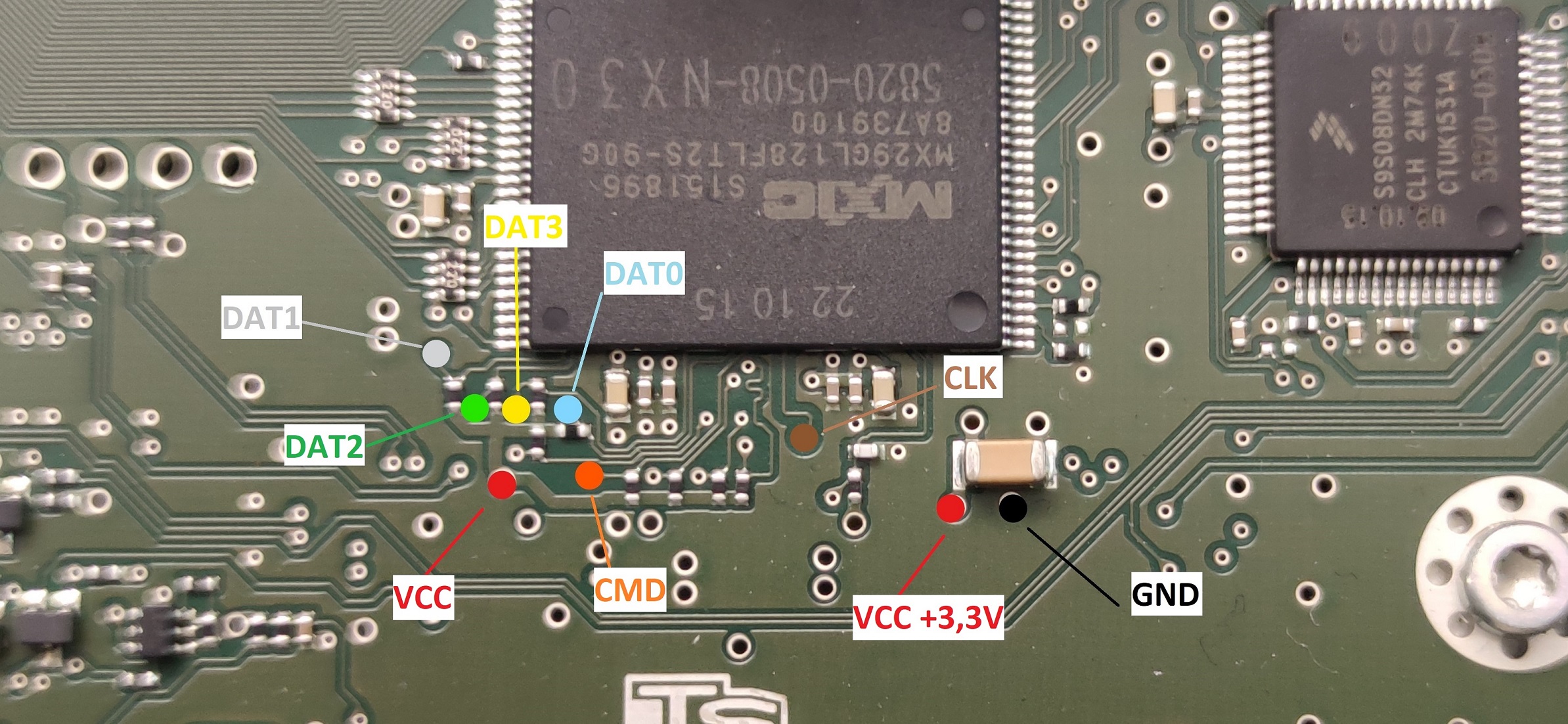
:::tip
PQ Unit is slower with DAT0 only compared to ZR Units. (around 2,5MB/s)
This is also dependent on the SD card reader used, ZR units could be also have a slow (2.7MB/s) connection do to the usage of an old adapter
:::
Windows 8/10
Read
Connect the wires/SD Card/Card Reader and open the HDD Raw Copy Tool
Select Source → Select your Card Reader (take a look at the nested Docs for working Card Readers)
Select Target → FILE save and name it where/as you want (Dump.img for example)
START. It will take some time because reading/writing with only one DAT0 line happens with around 5MB/s. (ZR Units)
Write
Connect the wires/SD Card/Card Reader and open the HDD Raw Copy Tool
Select Source → FILE (Dump.img - After you modified your data or want to write a backup)
Seldect Target → CardReader
START. It will take some time because reading/writing with only one DAT0 line happens with around 5MB/s. (ZR Units)
Linux
https://mibwiki.one/share/954d321f-7e61-481b-8bd2-24b53a19cc45
:::tip If Something wents wrong there is maybe a contact Problem. The solution works definately when the contact is fine. I use a glass fiber pen to clean the contacts and seal it after the work is done. It's on you, if you want to to it or not.
Also had a problem with a defect SD Card Reader (Read only, No write).
:::
:::tip
If using only DAT0 :
Not all readers support operation using only DAT0 line. If you encounter strange problems during detection, try taping over the DAT1 to DAT3 on a normal sd card to check your reader supports this operation.
:::
Useful References
- https://www.digital-eliteboard.com/threads/mib2-std-pq-zr-how-to-update.494459/
- https://forum.xda-developers.com/t/success-to-hack-technisat-mib2-infotainment-system.3584185/
- https://www.drive2.ru/l/573969809784439237/ (use google translator)
- https://www.drive2.ru/l/568827668779238365/ (use google translator)
Useful Adapter if you dont want to use a micro SD/SD Adapter and some other parts…
BDM probes
Glass fiber pen (if you want to clean the PCB from the green shell)
Solder resist ink (green) for fixing the cleaned parts